Can You See Who Viewed Your Instagram Note in 2026? (No — Here's Why)
Can you see who viewed your Instagram Note in 2026? No — there is no viewer list. You only see replies. Who can see Notes, how long they last, and privacy settings explained.
Explore 68 articles connected to the topic: social media tips.

Can you see who viewed your Instagram Note in 2026? No — there is no viewer list. You only see replies. Who can see Notes, how long they last, and privacy settings explained.

Is Instagram adding profile views in 2026? No — Instagram still does not show who viewed your profile. Some accounts see a private 14-day visit count only. Full breakdown inside.

Instagram Reels vs TikTok in 2026 — which grows faster? TikTok wins discovery from zero; Reels wins conversion and shopping. Compare reach, RPM, and how to post to both.

Turn off Instagram active status in 2026 and hide the green dot and last seen. Step-by-step for iPhone, Android, and desktop.

How to go live on TikTok in 2026: 1,000 followers, age 16+, 30-day account, LIVE button setup, gifts, and common fixes.

YouTube Shorts maximum length is 3 minutes (180 seconds) in 2026, not 60 seconds. Exact length rules and the best length for retention.

No — Instagram does not notify screenshots of Stories, posts, Reels, profiles, or profile pictures in 2026. The only exception is disappearing photos and videos in DMs (Vanish Mode).

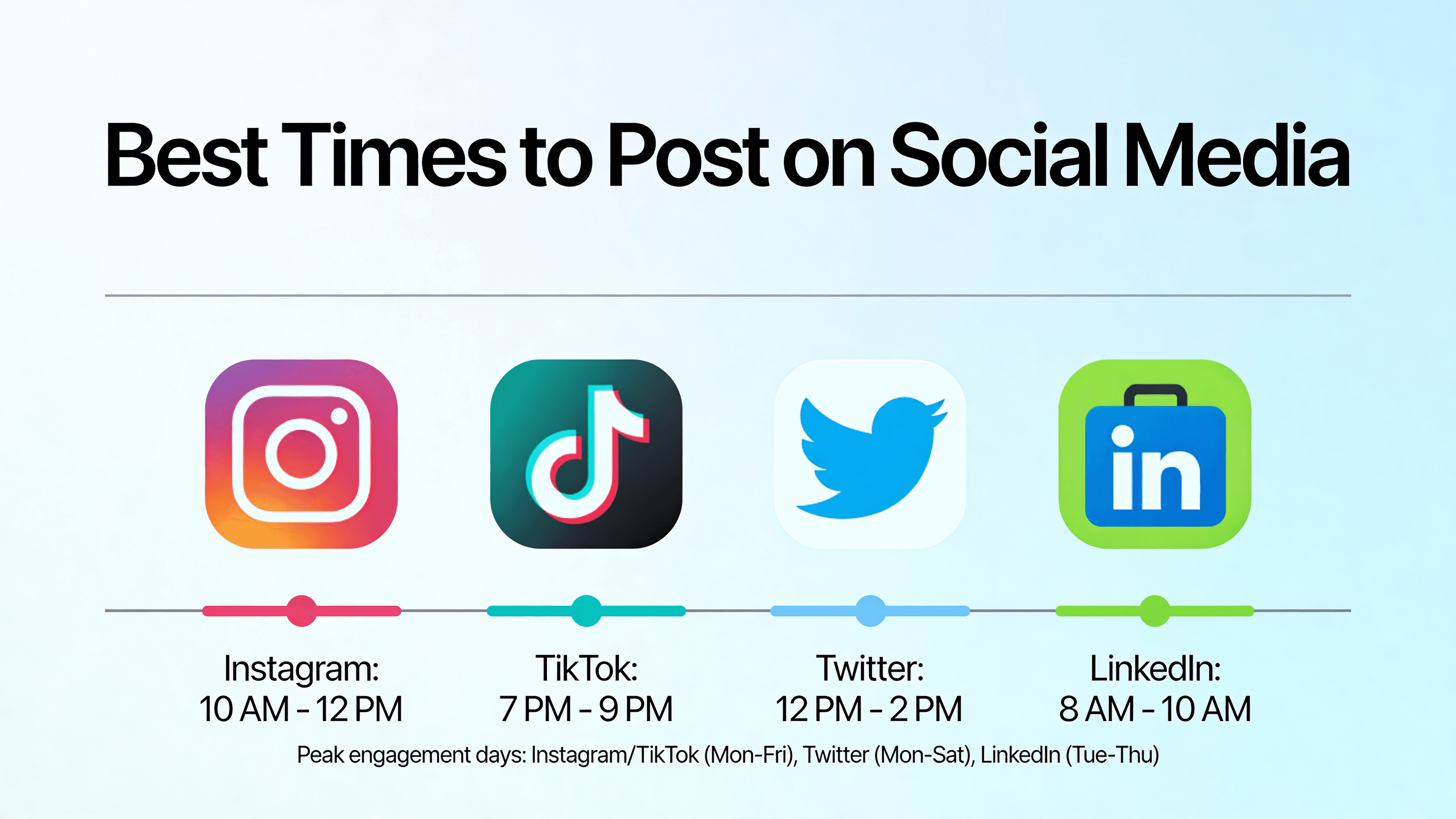
Best time to post on Instagram in 2026: Tuesday-Friday 9-11 AM and 5-7 PM. Day-by-day windows for Reels, feed posts, and Stories.

Instagram User means someone blocked you, deleted/deactivated their account, or was disabled. Here's how to tell which one and what happens to DMs.

Want to see who shared your Instagram post? Here's what Instagram actually shows you, what it hides, and how to use share data to grow.

Plan a cohesive Instagram grid in 2026 — 5 layout styles (checkerboard, row theme, color palette, puzzle, monochrome), free planner tools, exact dimensions, and the rule that keeps your grid intact when you post Reels.

Learn how to create an Instagram slideshow using carousel posts, Reels, and Stories. Step-by-step instructions with tips to boost engagement.

YouTube Shorts size in 2026: 1080×1920 px (9:16 vertical), minimum 720×1280, MP4/H.264 format, and UI safe zones for captions and text.

YouTube Shorts music copyright policy 2026 explained: licensed songs from the sound picker are usually allowed — but Content ID may claim revenue. Claims, strikes, and safe music sources.

How many hashtags to use on YouTube Shorts in 2026: start with #shorts, add 3–5 niche tags, avoid #viral/#fyp, and never exceed 15 hashtags.

Instagram post sizes in 2026: feed 1080×1080 or 1080×1350, Reels/Stories 1080×1920, carousels, profile photos, and safe zones.

How to write Instagram captions that drive engagement — plus 50 ready-to-use caption examples for different niches, moods, and post types.

Unhide a Facebook post in 2026 from Archive, Activity Log, profile timeline, or News Feed preferences. Step-by-step for mobile and desktop.

Disable comments on any Facebook post in 30 seconds — different paths for Pages, Groups, and personal profiles, before or after publishing. Plus the audience-restriction trick when the toggle is missing.

How to know if someone blocked you on Instagram in 2026 — 7 clear signs and how to check. Instagram does not notify you, but these clues make it obvious.

Tag someone in a Facebook post in 2026: type @ + name, tag people in photos, tag Pages, add tags after publishing, and fix missing tag options.

Cross-post from a Facebook Page to Instagram automatically with Meta Business Suite, or share a personal post manually in 4 taps. The aspect-ratio fix, Page vs. profile differences, and a third-party fallback.

Instagram doesn't notify unfollows in 2026 — but you can detect them. The native manual check, the third-party tracker apps that won't get you banned, and the password rule that protects your account.

How to repost a TikTok in 2026 in 2 taps — who sees it, how to undo, and how reposting differs from duetting or saving to your profile.

Repost an Instagram Story, feed post, or Reel in 2026 — what's possible natively, when you need a third-party app, and the credit etiquette that prevents account strikes.

Post anonymously on Facebook in 2026 using Group anonymous posts, posting as a Page, or privacy settings. What hides your name and what does not.

Pin a Facebook post to the top of your profile, Page, or Group in 30 seconds — exact taps for mobile + desktop, plus how to unpin and what happens when you pin a new post.

How to make YouTube Shorts in 2026 — film in the app, upload 9:16 video from phone or desktop, #shorts tag rules, and the 3-minute length limit.

Make a Facebook post shareable in 2026 by changing privacy to Public. Step-by-step for mobile, desktop, old posts, Pages, and future posts.

Instagram has no direct hide-follower-count toggle in 2026 — here's what you can actually hide (followers list via private account, like counts per post), what stays visible, and the workarounds creators use.

How to go live on Instagram in 2026: no follower minimum, Live setup, guests, badges, scheduled Lives, replays, and fixes.

Duet any TikTok video in 30 seconds — pick side-by-side, react-cam, or greenscreen layouts. Includes how to enable or disable duets on your own videos and the privacy gotcha most creators miss.

How to disable or hide YouTube Shorts in 2026: no permanent off switch — use Not interested, mobile shelf hiding, browser extensions, and uBlock filters.

Delete a Facebook post in 30 seconds, bulk-delete an old archive, or recover something you deleted by mistake — full step-by-step for mobile, desktop, Pages, and the 30-day Recycle Bin window.

How to add music to a Facebook post in 2026 on iPhone, Android, or desktop. Covers Stories, Reels, Business Pages, and missing music buttons.

Facebook post size guide for 2026 — Reels and Stories 1080×1920, link shares 1200×630, square feed 1080×1080, and cover photo dimensions with safe zones.

Social media post sizes for 2026: Instagram, TikTok, YouTube, Facebook, Pinterest, and Threads image and video dimensions in one cheat sheet.

Hook video for Shorts in 2026: 50+ copy-paste opening lines for TikTok, Instagram Reels, and YouTube Shorts that stop the scroll in 3 seconds.

Build a social media content calendar that keeps you consistent. Includes a free weekly template, content category frameworks, and tips for planning across platforms.

Social media scheduling vs automation in 2026 — scheduling uses official APIs to publish at a set time; automation means bots, auto-DMs, and auto-follows that risk bans. Which is safe for growth.

How to schedule LinkedIn posts in 2026 with LinkedIn's built-in clock icon scheduler. Company Pages, best times, and pairing with TikTok/Instagram schedulers.

Best time to post on Threads in 2026: weekday mornings 7–10 AM and evenings 6–9 PM. Day-by-day table plus auto-publish with a Threads API scheduler.

Threads API automatic post in 2026 — schedule Threads posts to auto-publish via PostLink, Meta Business Suite, or reminders. Compare methods, API limits, and the fastest setup.

How to schedule Facebook Page posts in 2026 with Meta Business Suite or a Facebook post scheduler. Cross-posting, queue limits, and personal profile limits.

How to schedule Pinterest pins in 2026 — free Pinterest scheduler trial or native Pinterest scheduling. Boards, timing, limits, Idea Pins, and cross-posting from one tool.

How often to post on social media in 2026: TikTok, Instagram, YouTube, Facebook, Pinterest, Threads, and LinkedIn frequency by platform.

Best time to post on YouTube in 2026: weekdays 2–4 PM, Thursday 12–3 PM, plus Shorts vs long-form timing and day-by-day upload windows.

Best time to post on Pinterest in 2026: evenings 8–11 PM and weekends for most niches. Day-by-day windows plus how to queue pins with a Pinterest scheduler.

Rank in Pinterest search in 2026 — keyword research, Pin title + description optimization, board name strategy, alt text, and the freshness signal Pinterest's algorithm prioritizes most.

The best time to post on Facebook in 2026: Tuesday–Thursday 9 AM–1 PM in your audience's time zone. Peak windows by day for Pages, Reels, and video.

How to make money on social media in 2026: brand deals, affiliate marketing, creator funds, digital products, services, merch, and live tipping — ranked by audience size.

Best time to post on TikTok in 2026: Tuesday–Friday 7–9 AM, 12–3 PM, and 7–9 PM. Day-by-day windows plus auto-publish with a TikTok scheduler.

How to schedule TikTok posts in 2026 — free TikTok scheduler trial or TikTok's native scheduler. Auto-publish, captions, 700MB uploads, and cross-posting to Reels and Shorts.

Learn exactly how to get your first 1,000 TikTok followers in 2026. What to post, how often, and what actually drives follower growth on TikTok for new accounts.

Here's exactly how to get your first 1,000 Instagram followers in 2026 — without buying followers, using bots, or wasting months on strategies that don't work.

Run out of Instagram Story ideas? Here are 50 creative Instagram Story ideas for creators and businesses — organized by type and easy to adapt to any niche.

Learn how to increase Instagram engagement in 2026. Proven tactics to get more likes, comments, saves, and shares — and why each engagement type matters differently.

Learn how to grow on Pinterest in 2026. Strategies for increasing monthly views, gaining followers, and driving consistent traffic from Pinterest to your website or store.

Schedule Instagram posts, Reels, carousels, and Stories in 2026 with Meta Business Suite, Instagram's scheduler, or PostLink. Free and paid methods compared.

Learn how to grow on TikTok in 2026. Proven strategies for getting more views, gaining followers, and building a TikTok audience that actually sticks around.

Batch a full week of TikTok, Reels, Shorts, and feed posts in one 3-hour session — pillars-first ideation, shoot day, edit day, schedule day. The exact workflow creators with day jobs use to stay consistent.

A practical social media strategy for small businesses in 2026. Learn which platforms to focus on, what to post, how often to post, and how to do it without a full-time team.

Learn how to grow your YouTube channel with Shorts in 2026. Discover what makes Shorts perform, how to structure them, and how to use them alongside long-form content.

Learn how to repurpose one piece of content across TikTok, Instagram, YouTube, Facebook, Pinterest, and Threads. Work smarter, not harder with your content strategy.

Stuck on what to post? Here are 100 social media content ideas for Instagram, TikTok, YouTube, and more — organized by content type and easy to adapt to any niche.

Learn how to write social media captions that stop the scroll, drive comments, and get shared. Includes caption formulas and examples for Instagram, TikTok, and Facebook.

Do TikTok hashtags still matter in 2026? Here's the honest answer plus a practical hashtag strategy to help your videos reach the right audience.

Learn how to grow your Instagram account in 2026. Proven strategies for getting more followers, increasing Reels reach, and building an engaged audience.
Compare social media scheduler alternatives or see how PostLink handles multi-platform publishing.